



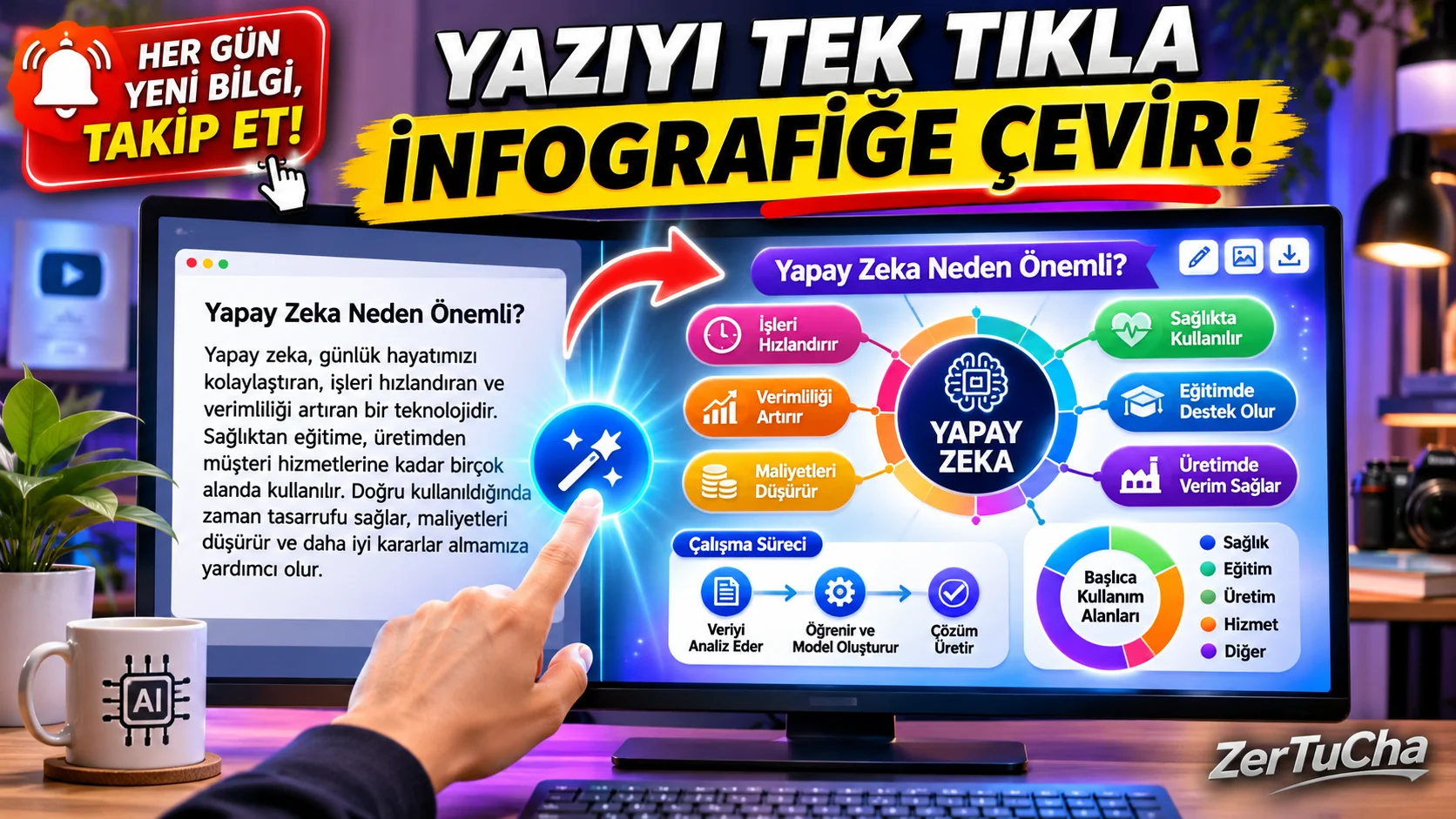
When you prepare a long blog post, business report, training note or social media series, the biggest obstacle that intimidates the reader is the long walls of text lined up one under the other. The human brain perceives visuals many times faster than plain text; However, when you want to draw an elegant process diagram, comparison funnel, mind map or infographic that summarizes the topic next to a paragraph you have written, it takes half an hour to align the boxes, look for the appropriate icon and match the colors in Canva or design programs! Moreover, when you try to draw a diagram with artificial intelligence tools that produce classical images, it writes the Turkish letters in it with distorted and meaningless symbols! Well, have you heard of the new generation tool that produces dozens of schemas with 100% smooth and editable texts in 3 seconds, without even having to write any design commands (prompts), when you just paste your own Turkish text and press the small spark icon next
Leave a Comment to Read the Rest of the Article
Did you find our content useful? We are curious about your thoughts on the subject.
to the paragraph? Free loan details and workflow are right below!
SITE NAME AND LINKS
-
Site Name: Napkin AI
-
Official URL: https://www.napkin.ai/
-
Origin / Service Language: USA (Napkin AI – Pramod Sharma & Jerome Scholler) / English interface (Full support for understanding Turkish texts and converting Turkish letters into error-free/editable schemes!)
-
Pricing and Security Information: https://www.napkin.ai/pricing/
Napkin AI (napkin.ai) works with a completely different logic than classical artificial intelligence that draws pictures (Midjourney/DALL-E etc.): Instead of producing a pixelated photo, understand the logical relationship of your existing Turkish text (is it a step-by-step process, a plus-minus comparison, a timeline, a hierarchy) and create structured infographics with real vector boxes, arrows and icons generates!
You can change the word you want by double-clicking on each Turkish heading on the generated schema, you can replace the icon automatically selected by the artificial intelligence next to each item with a different icon with a single click, and by turning the wheel on the left, you can More than 20 different design alternatives (color cards, circular loops, herringbone, funnel, timeline) you can choose your favorite!
STEP BY STEP USE
-
From your desktop browser https://www.napkin.ai/ and sign up for free with your Google account or email.
-
"New Napkin" button and "Blank Napkin" and paste the Turkish blog post, lecture notes or presentation text you want to visualize onto the page (or
.docx / .pdf / .mdfile directly). -
The blue Lightning / Spark ("Generate Visual") icon!
-
In approximately 3–5 seconds, diagrams specially produced for your Turkish text will open just below the paragraph; by scrolling through the category options on the left Flowchart, Mind Map, Process or Comparison looks and color styles.
-
After arranging the Turkish texts or icons on the boxes as you wish, Download (Export) icon and select PNG or PDF!
REQUIREMENTS AND LIMITS
Image production is currently on desktop browsers works (mobile browser generation is not supported). Weekly on free plan 500 AI credits is given (each word selected costs about 1 credit; that is, a 50-word paragraph can produce about 10 different schemes per week, while editing colors and text costs no credits). Free exports have the fixed Napkin logo in the corner, and PPT/SVG format is available in the paid Plus package.
PRIVACY AND SECURITY
Napkin AI has SOC 2 Type II, ISO 27001 and GDPR compliance standards, according to its official security page. Anonymized interaction data on individual (self-serve) accounts can be used to develop the model; if you don't want this Account Settings menu (Opt-out). It is recommended that you avoid uploading confidential corporate secrets.
ADVANTAGES, DISADVANTAGES AND WHOM IT IS SUITABLE FOR
-
Advantages: Generation of meaningful schema in 3 seconds directly from the existing Turkish paragraph by typing zero prompts, 100% editable Turkish text boxes instead of broken artificial intelligence letters, 500 free credits renewed every week.
-
Disadvantages: PNG/PDF images downloaded in the free plan have the Napkin watermark locked and are produced only in the desktop browser.
-
Who is it suitable for: Writers, teachers and academics who want to enrich their blog posts with infographics, white-collar workers who prepare presentations and those who produce LinkedIn/social media flashcards.
BRIEF CONCLUSION
When you want to explain a long text to the reader at a glance, do not spend hours drawing boxes and arrows; your paragraph napkin.ai, press the blue spark icon and watch it turn into a diagram in 3 seconds!



No comments yet. Be the first to comment!
Leave a Comment