

No More Scrolling Screens to Search for Apps: Try Kvaesitso
Application: Kvaesitso
- Kvaesitso official GitHub repository
- Kvaesitso official releases
- Kvaesitso — F-Droid page
- Kvaesitso user guide
The application does not have an official Google Play store page. It is available from the official project repository and F-Droid. The source code repository provides details about current version information and installation channels.
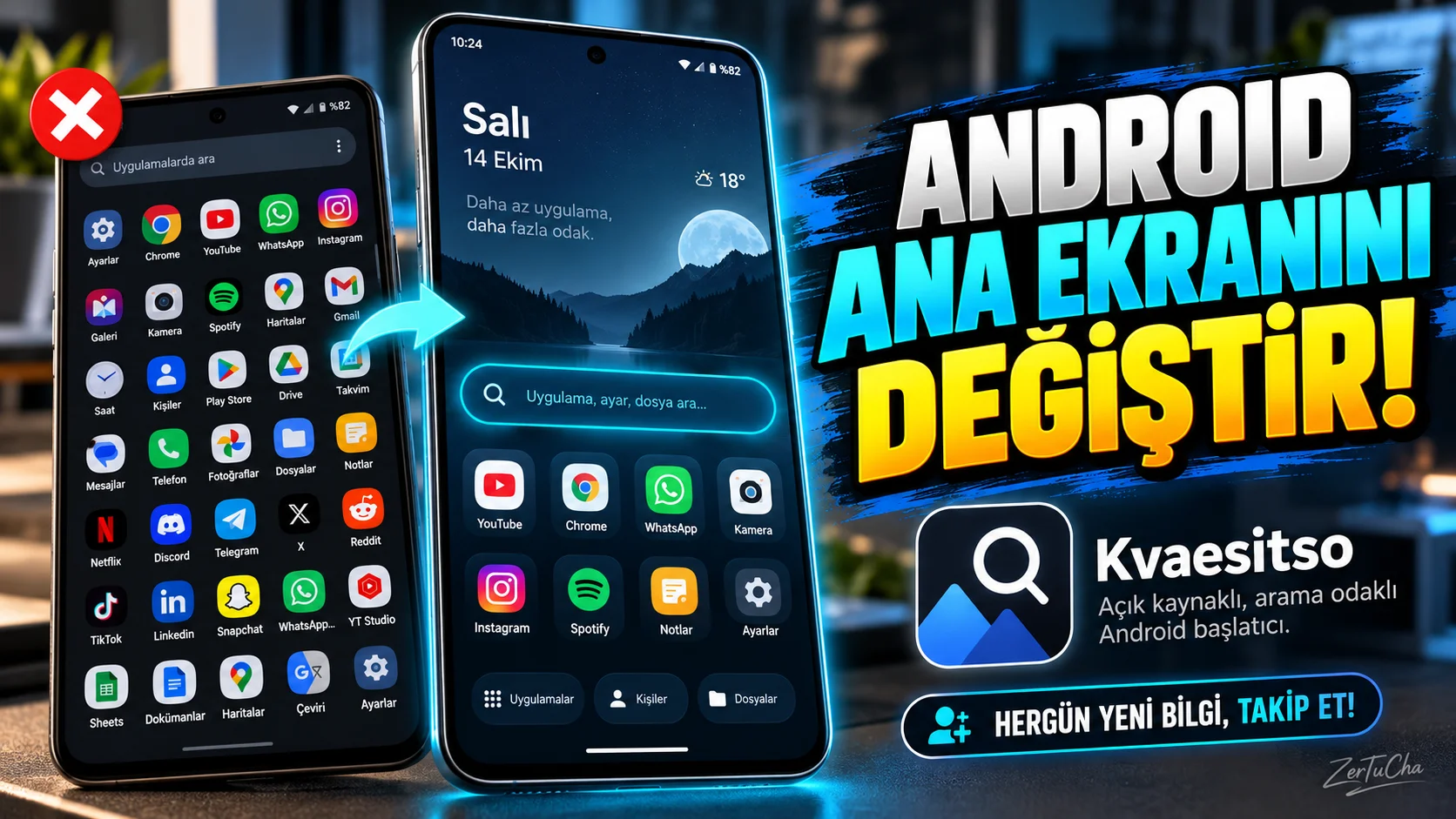
Do you have dozens of applications on your phone and are you constantly scrolling through the screens to find what you are looking for? Then let's take a look at the launcher called Kvaesitso developed for Android.
Kvaesitso is a free and open source application that replaces your phone's home screen. It offers a search-oriented usage instead of the classic icon layout. In other words, instead of scrolling through application icons, you can access the application you are looking for more directly.
You can also organize your favorite apps and widgets. Thus, you can shape your phone according to your own usage habits.
But there is an important detail here. This app only works on Android and requires Android 8.0 or above. Also, since it changes the main screen, it may take some getting used to at first.
I also recommend you to review the permission list regarding privacy. Launchers may request extensive system permissions for some features.
If you want to change the appearance and usage of your phone, you can research Kvaesitso. Moreover, you can get a new experience without purchasing a paid launcher.
WHAT DOES IT DO?
On most Android phones, the home screen is designed around app icons and widgets. As the number of applications increases, you may have to navigate between screens to find what you are looking for.
Kvaesitso offers a search-oriented home screen.
The goal is to center the search instead of constantly searching for icons to reach the application or shortcut you want.
For example:
- If you have many applications on your phone, you can find them by searching their names.
- You can make your frequently used applications more visible.
- You can organize your home screen according to your own usage habits.
- You can access your frequently performed transactions faster by using widgets and shortcuts.
Kvaesitso is not an app store; It is a launcher that replaces Android's home screen and app launch experience.
HIGHLIGHTS
Search focused main screen: Focuses on accessing through search rather than navigating through applications.
Favorites and widgets: You can show your frequently used applications in a more useful layout on the home screen.
Shortcuts: You can access supported application shortcuts faster.
Personalization: You can change the home screen appearance and usage style according to your needs.
Developing project: Version 1.41.0 dated September 15, 2026 includes improvements such as excluding application shortcuts from search results and editing widget behavior. GitHub
WHY IS IT WORTH EXPLORING?
The difference with this application is that it aims to do more than changing the appearance of the phone: changing the way of accessing applications.
For example, if you have installed dozens of applications, you do not have to place each of them somewhere on the home screen. Search-oriented usage may be more practical for you.
The fact that it is free and open source is also an advantage for those who want to change the usage experience of their own phones.
But it's not necessarily better for everyone. If you are used to the icon layout, it may take time to get used to the new system in the first days.
ADVANTAGES AND DISADVANTAGES
Advantages
- Free and open source.
- The app centers on search.
- Home screen and widget layout can be customized.
- New versions are released regularly.
- Offers a different approach than the standard home screen experience.
Disadvantages
- Only works on Android.
- Requires Android 8.0 and above.
- You may need to change your habits during the initial setup.
- Some advanced features may depend on certain permissions or external services.
- Users who do not want to grant access to a large number of features should carefully review the permission list.
WHO IS IT SUITABLE FOR?
Suitable for:
- Those who have many applications on their phones.
- Those who want to see fewer icons on the home screen.
- Those who prefer to open applications via search.
- Those who like to customize their Android phone.
- Those who prefer open source software.
Not very suitable:
- Those who are satisfied with the current home screen of their phone.
- Those who do not want to deal with the settings.
- iPhone users.
- Those who do not want to install applications without reviewing extensive permission lists.
STARTER GUIDE
- Get Kvaesitso on your Android phone from F-Droid or from the developer's official release page.
- After installation, open the screen for choosing Android's default home screen app.
- Select Kvaesitso as default launcher.
- Using the search screen, open a few applications and try their usage.
- Organize your favorite apps and widgets.
- Review the app's permissions; grant only necessary permissions for features you will actually use.
Important: Changing the home screen app does not change your phone's operating system. You can go back to the previous launcher from Android settings whenever you want.
PRIVACY AND RELIABILITY
Kvaesitso's source code is publicly available and the project is under active development. However, being open source does not mean that all the permissions requested by the application are automatically safe.
F-Droid page has an extensive list of permissions related to location, contacts, calendar, installed applications and some phone operations. Some of these permissions may be linked to the launcher's shortcut, widget, and app integration features. However, not every user needs all permissions. F-Droid
Recommendation:
- Get the app from official project sources.
- Check Android's permission manager after installation.
- Don't give unnecessary permissions for integrations you don't use.
- Evaluating open source code as a security guarantee.



Henüz yorum yapılmamış. İlk yorumu siz yapın!
Bir Yorum Bırakın