

You can create a 3D model from the photos you took with your phone! What is Agisoft Metashape Pro?
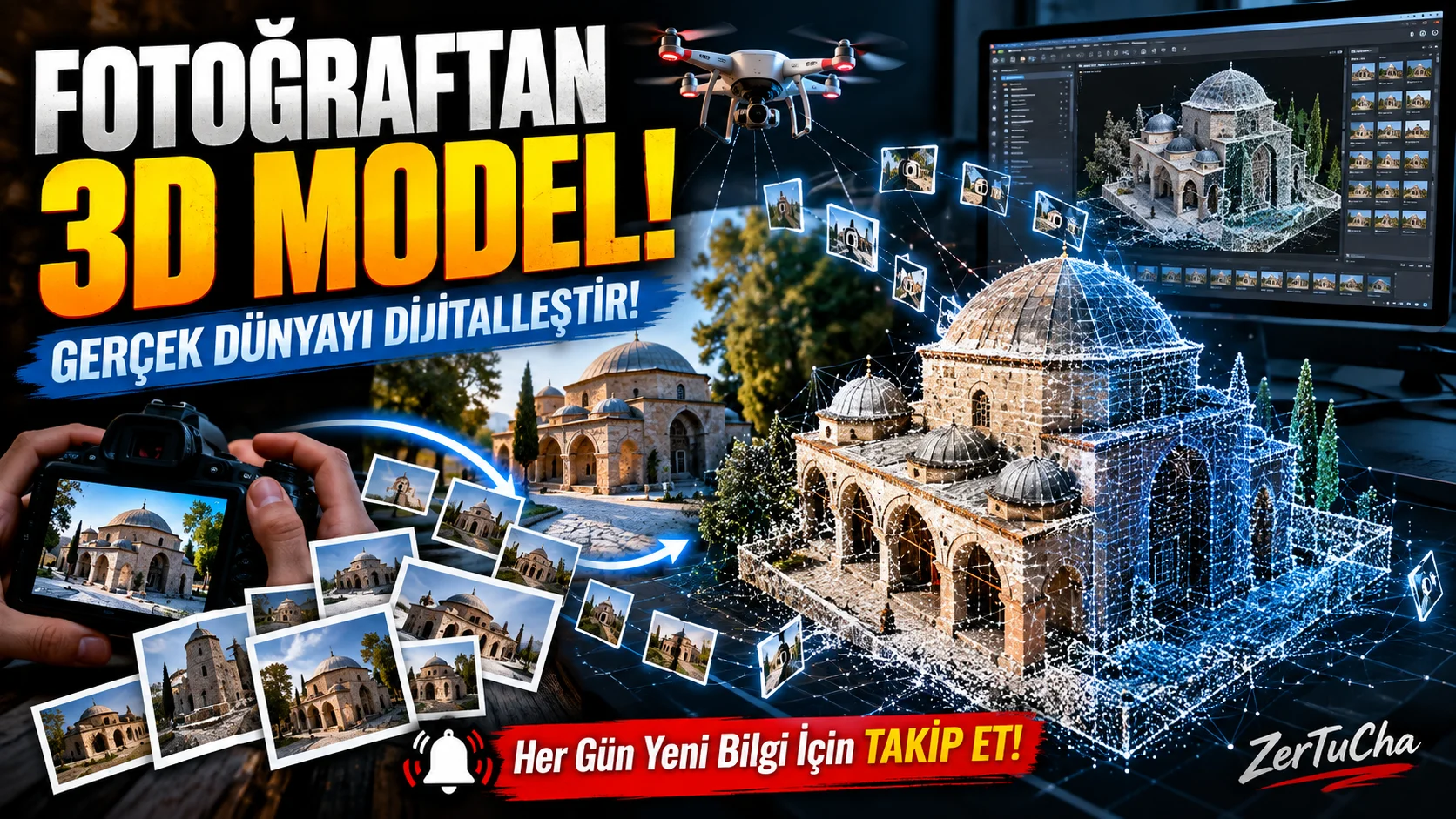
The most interesting aspect of this program is that it can create a three-dimensional model of an object or structure on the computer using photographs taken from different angles. This means you do not have to draw every point manually, as in classic 3D modeling programs.
This is a particularly strong topic for architecture, cartography, archaeology, documentary and digital content production.
What exactly does Agisoft Metashape Pro do?
So what does photogrammetry mean?
In its simplest form, it is the technology of recreating the three-dimensional structure of an object or area in a computer environment by using photographs taken from different angles.
For example, consider an old historic building. You have hundreds of photos taken from the front, back, sides and different heights of this building.
Metashape analyzes these photos, finds common points, calculates the positions of the cameras and creates a three-dimensional structure from the images.
As a result, you have not just a photo, but a digital model that you can examine from different angles, make measurements and transfer to other 3D software.
The most remarkable features of the program
1. Creating realistic 3D models from photos
I think this is the most impressive feature of the program.
For example, you placed a statue on your desk. You walk around this statue and take lots of photos from different angles.
When you import photos into Metashape, the software analyzes common details in the images and starts creating the three-dimensional geometry of the object.
At the end of the process:
-
The three-dimensional geometry of the object is being created.
-
Textures obtained from real photographs are applied to its surface.
-
The model can be examined from different angles.
-
Can be exported to suitable file formats.
This feature is especially valuable for game developers, 3D designers, museums and digital archiving institutions.
2. Creating terrain maps from drone photos
Now let's move on to a more interesting usage area.
Imagine photographing a field, construction site or large area with a drone.
Normally you have hundreds of separate aerial photographs. Metashape can create high-detail orthophoto maps by combining these photos.
Orthophoto map is an image that has corrected perspective and terrain-related geometric distortions and can be associated with map coordinates.
In this way:
-
The current status of construction sites can be documented.
-
Agricultural lands can be examined.
-
Land changes can be followed.
-
Data can be prepared for maps and geographic information systems.
This feature is very important, especially in the mapping and construction industry.
3. Measuring terrain elevation and volume
Another important feature of Metashape is its ability to make measurements on the models it creates.
For example, you want to know how much soil was moved in an excavation area.
You can make distance, area and volume calculations through the digital terrain models created by the program.
It is necessary to know two concepts here:
-
DSM (Digital Surface Model): Represents the elevation of the visible surface, including trees, buildings, and other surface features.
-
DTM (Digital Terrain Model): It aims to represent the land surface cleared of elements such as vegetation and structures.
These models are used especially in cartography, mining, construction and land analysis.
4. Creating and editing point cloud
It may seem a bit technical at first glance, but it's actually quite important.
A point cloud is a representation of an object or terrain with millions of coordinated points in three-dimensional space.
Think of it this way: Imagine completely covering a building with tiny little dots. Each of these points represents a specific location of the structure.
Metashape can create, classify and organize this data.
For example, it is possible to distinguish between ground points on the land and vegetation points.
This feature provides a serious advantage, especially in large land projects and 3D scanning studies.
5. LiDAR and multispectral image support
Here is one of the features that takes the Professional version to a different level.
LiDAR is a technology that measures the distance of surrounding objects and surfaces using laser pulses.
Metashape Professional can process LiDAR data and combine laser scan data with 3D models derived from photographs.
Another feature is multispectral image processing.
For example, special cameras used in agriculture can record different light bands that the human eye cannot see.
Metashape can help calculate vegetation indices such as NDVI with this data.
So you can not only see the photo of the field, but also obtain data to evaluate the condition of the vegetation.
These features are particularly important for precision agriculture, remote sensing and scientific research.
6. Digitizing historical artifacts and cultural heritage
Another very impressive use of the program is archeology.
You can create a digital copy of a historical artifact by taking photographs from different angles.
Thanks to these digital models:
-
The current status of the works can be documented.
-
Deformations over time can be compared.
-
Works that are difficult to access physically can be examined digitally.
-
Three-dimensional contents can be prepared for museums and education projects.
So Metashape can be used not only to create maps or building models, but also to help preserve cultural heritage.
7. Use for 4D modeling and video games
There is a feature here that may interest content creators and visual effects experts.
Metashape supports 4D modeling of scenes that change over time with images taken from multi-camera systems.
4D modeling also takes into account the change of three-dimensional geometry over time.
For example, it is possible to create a dynamic digital reconstruction of a moving object or scene from images at different times.
This feature can be used in special projects in the cinema, visual effects and gaming industries. However, it should not be considered as an ordinary video editing tool.
How does Agisoft Metashape Pro work?
Now let's explain the working logic of the program through an example.
Let's say you want to create a three-dimensional model of a building.
1. You take the photos
You take photographs of the building from different angles, providing sufficient overlap. It is important that the same detail appears in more than one photo.
2. You transfer the photos to the program
Metashape analyzes the images and tries to calculate from which angles the photos were taken.
3. Creating point cloud
Three-dimensional point data is created with common information obtained from photographs.
4. A three-dimensional model is being created
Surface geometry is created from point data and textures are created from real photographs.
5. Exporting model
You can export the model you created to other 3D software or workflows with supported file formats.
The quality of these processes depends on the clarity of the photographs taken, the overlap ratio, lighting conditions, the surface structure of the object and the equipment used. Shiny, transparent or monochromatic surfaces can make the modeling process difficult.
What is the difference between Professional and Standard?
There is an important detail here. Agisoft has two different versions and there is a significant difference in prices.
|
Feature |
Standard |
Professional |
|---|---|---|
|
3D model from photos |
|
|
|
Dense point cloud |
|
|
|
Texturing |
|
|
|
Orthophoto and terrain models |
— |
|
|
LiDAR processing |
— |
|
|
Multispectral image analysis |
— |
|
|
Distance, area, volume measurement |
— |
|
|
Python automation |
— |
|
|
Network operation |
— |
|
So if you just want to create a 3D model of an object from photos, the Standard version can also do the trick.
But if you want drone mapping, professional surveying, LiDAR, multispectral analysis and advanced automation, the Professional edition is much more comprehensive.
Advantages — Why is it preferred?
-
3D model from real photos: You don't have to model everything by hand from scratch.
-
Professional measurement tools: You can analyze distance, area, volume and height.
-
Wide data support: It can work with drone, satellite, different camera systems and LiDAR data.
-
Advanced mapping: Can produce geographic data such as orthophoto, DSM and DTM.
-
Automation: You can automate workflows with Python and Java API support.
-
It appeals to different sectors: It can be used in architecture, archaeology, agriculture, mining, gaming and visual effects.
Disadvantages — Does it work on every computer?
We've come to the annoying part.
1. It requires a powerful computer.
Processing large photo sets can require a significant amount of memory and processing power. Agisoft recommends a multi-core processor and powerful graphics card.
2. The learning process is not easy.
You can't always get the perfect model by just uploading photos. You need to learn the photography technique, camera positions, overlap rates and model creation stages.
3. Photo quality directly affects the result.
Blurry images, insufficient light and reflective surfaces can cause poor results.
4. Professional license is quite expensive.
It may not make sense for individuals who will only occasionally create 3D models to bear such a high license cost.
5. Processing times may take longer.
Processing time and memory usage may increase, especially when working with hundreds or thousands of high-resolution photos.
What are the computer requirements?
Based on Agisoft's official hardware recommendations:
|
Hardware |
Basic configuration |
Advanced configuration |
|---|---|---|
|
Processor |
4–12 cores |
6–32 cores |
|
Memory |
16–32 GB |
32–128GB |
|
Video card |
RTX 2060 or RX 5600M samples |
RTX 3080 or RX 6800 XT samples |
These are examples of manufacturer's recommended configurations; They are not exact working limits. Memory needs may increase even more in large projects. GPU acceleration can also increase performance on supported processing steps.
Is there a fee? Is it available for free?
Agisoft Metashape Professional
Professional version · Perpetual license
$3,499
Professional node-locked license price listed on the official store. Excluding taxes.
Standard version: $179
The price difference between the Professional and Standard versions is quite high.
Prices checked on 30 October 2026. Check the current amount and payment terms at the time of purchase.
So how does the licensing system work?
There's a nice detail here: Agisoft's regular licenses are offered as perpetual licenses, not monthly or annual subscriptions.
-
Node-locked license is activated on a single computer; It can be transferred to another computer when necessary.
-
License includes 12 months of email technical support.
-
The license includes free updates to the 2.x version family.
-
The Professional version also has a floating license option.
Educational licenses are also available, but only for eligible educational institutions, their students and employees, and for non-commercial use.
Is there a free trial?
Yes! You can use the fully functional 30-day trial version of the program. There is also a demo mode where export and saving features are restricted.
Who is it suitable for?
|
User |
Compatibility |
|---|---|
|
Architects and engineers |
Very convenient
|
|
Mapping engineers |
Very convenient
|
|
Drone operators |
Very convenient
|
|
Archaeologists and museums |
Very convenient
|
|
3D modeling experts |
Suitable
|
|
Game developers |
Suitable
|
|
Those who do 3D modeling for hobby purposes only |
Standard may be sufficient
|
|
Daily computer users |
Not required
|
Is Agisoft Metashape Pro worth the money?
In my opinion, Agisoft Metashape Professional is a software that is really strong in its field and developed for serious work.
The most important advantage is that it not only produces beautiful looking three-dimensional models from photographs. At the same time, it can work with geographical coordinates, make land measurements, process LiDAR data and be involved in professional mapping processes.
However, due to its price of $ 3,499, it is not a program that I would recommend everyone to buy.
My recommendation: If you only want to create 3D objects from photos, consider the Standard edition. The Professional edition makes sense if you are doing drone mapping, engineering, precision surveying, LiDAR and professional geospatial data processing.
Let's also say this: Learning this program is not just learning a new software; It means bringing together photography, three-dimensional modeling and digital mapping skills.



Henüz yorum yapılmamış. İlk yorumu siz yapın!
Bir Yorum Bırakın