

Artificial Intelligence Separates Vocals and Instruments from a Single Song! SpectraLayers Pro 13
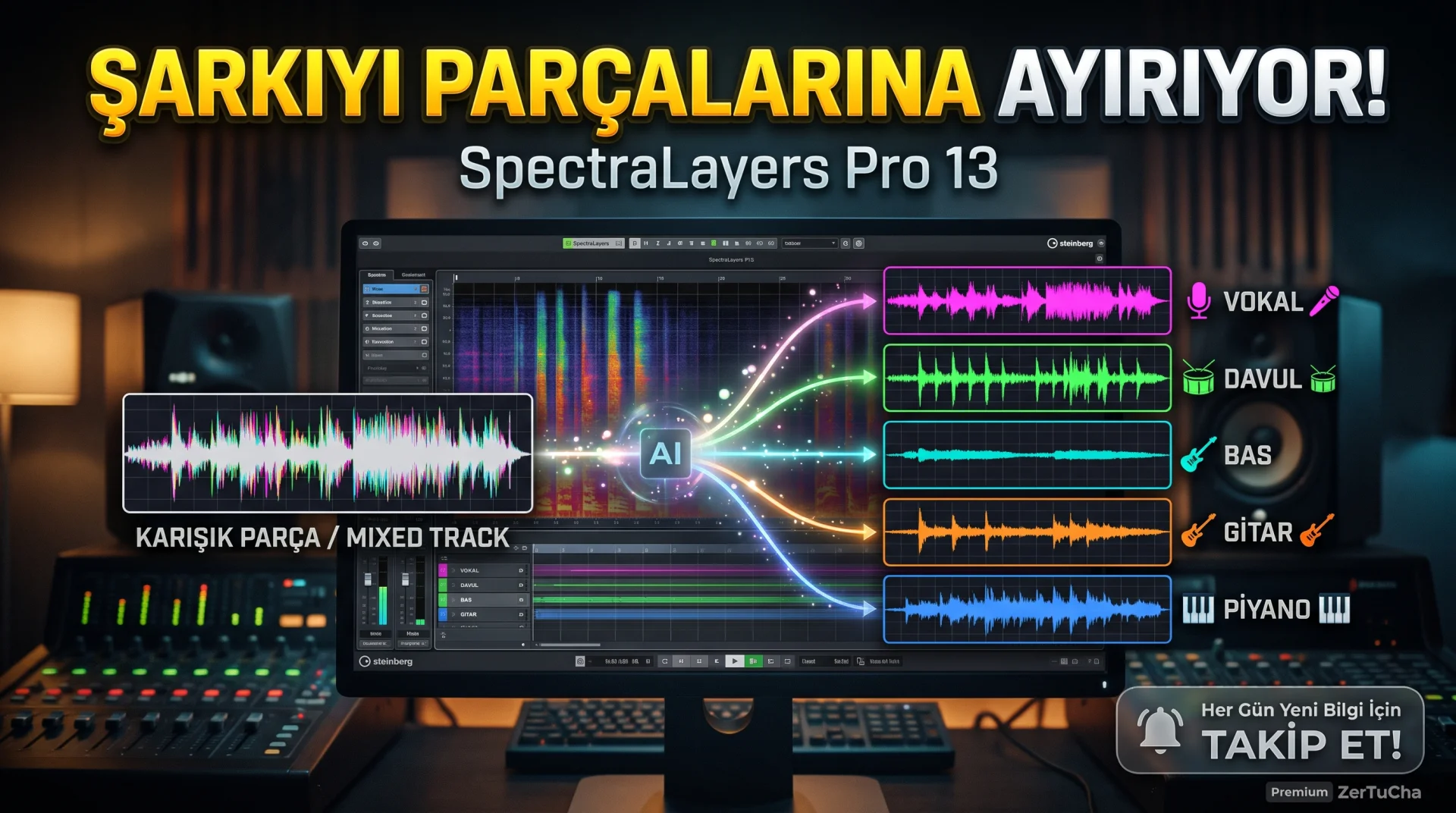
Is it possible to split a song into parts?
Friends, today we are reviewing a program that may attract the attention of those who work with music, video makers, podcasters and those who work with sound recordings.
The name of our program is Steinberg SpectraLayers Pro 13.
Think of it like this: You have a song and you want to arrange the vocals, drums, bass guitar, piano and other instruments separately in this song. You don't have separate recordings of these instruments; there is only the completed music file.
SpectraLayers Pro can help you with this task with its artificial intelligence-supported audio separation tools. And it's not just music shredding; It can also perform operations such as reducing mouth sounds in speech recordings, cleaning unwanted sounds and repairing damaged voice areas.
But let's make an important distinction at the beginning: Artificial intelligence cannot separate every record perfectly. Conclusion; It depends on the quality of the recording, how well the instruments are mixed together, and the processing chosen.
1. What exactly does SpectraLayers Pro 13 do?
You can think of this program as the Photoshop of audio editing.
You can select and modify a specific part of the image in a photo editing program. In SpectraLayers, you can process the sound by selecting only a certain time interval or frequency region.
This area where the sound is visually examined is called spectrum view. Here you can see the change of sound over time and its different frequency components.
For example, if there is a thin whistling sound that is constantly heard in a recording, you can try to reduce it by selecting the relevant region where this sound creates a distinct trace in the spectrum. It is possible to work more precisely on the problem area instead of interfering with the entire recording.
2. Can separate vocals, drums and instruments in a song
One of the most striking features of the program is Unmix Song tool.
This tool can attempt to split a supported music recording into the following components:
-
Vocal
-
Drums
-
Press
-
Guitar
-
Piano
-
Saxophone and brass
-
Other sounds
During the process, Fast, Balanced or High can be selected among the quality options. More detailed operations may take more time.
So what does this do in practice?
Let's say you're making a music video and you only have the entire song. By placing the vocal on a separate layer, you can gain more control, examine individual instrument parts, or work on a remix.
Musicians, arrangers and sound designers can also use this parsing for analysis and editing purposes.
But remember this: Artificial sounds, metallic tones or vocal residues may be heard after separation in instruments that are very mixed together. Especially in professional deliveries, it is necessary to listen to the result carefully with headphones.
3. Removing unwanted sounds from conversation recordings
Now let's come to the side that concerns content creators.
You have received a recording of an interview. The speaker speaks well, but the recording contains lip smacking, clicking-like noises, or other minor disturbances.
The Voice DeClick tool in SpectraLayers Pro 13 can be used to reduce such unwanted mouth sounds in speech recordings.
Voice DeCrosstalk helps distinguish the target speaker from other voices in some recordings where the voices of more than one person are mixed together.
These tools may be particularly useful for:
-
YouTube interviews
-
Podcast recordings
-
Documentary and video voice-overs
-
Dialogue and post-film sound editing
-
Field recorded conversations
Of course, don't think that a bad microphone will solve all your problems with a single click. Very loud background noise, echo, or overlapping speech may still require careful editing.
4. Can attempt to repair damaged sounds
One of the notable features of SpectraLayers Pro 13 is the Reconstruct tool.
This tool attempts to reconstruct missing or distorted spectral information in the selected sound region by analyzing surrounding sounds.
For example, if there is a brief audio interruption or a corrupted section, it can be used to repair the missing area.
But there is an important limit here: The program does not precisely restore the lost actual sound information. While it may produce a very good-sounding result in some cases, it may produce artificial or inaccurate tones in other recordings.
So it's better to consider this as a powerful repair tool, not a magic recovery button.
5. New editing possibilities in music and movie sounds
SpectraLayers Pro isn't just designed for music production. It can also be used in film, video, games and other audio post-processing processes.
The Unmix Sound Effects tool, introduced in Version 13, aims to separate short sound effects from the surrounding ambient sounds. Ambience Heal, on the other hand, helps fill some gaps in the sound spectrum after decomposition with ambient sound.
What this means is that let's say there is wind noise in the background in a scene, and you want to separately process a specific sound effect within that environment. Such tools can make your job easier, depending on the structure of the source record.
You can also run the program standalone or integrate it with compatible audio editing applications. According to Steinberg's documentation, ARA integration with various applications such as Cubase, Nuendo, Pro Tools, REAPER and Studio One is supported; Compatibility may vary depending on the version and host program used.
6. How to use? First audio separation
Here's the basic workflow for a first-time user:
Step 1: Install the program on your computer and create a new project.
Step 2: Import the audio file you want to edit. It would be a good idea to use a short, understandable and, if possible, high-quality WAV file for your first try.
Step 3: Select the audio layer and open the Unmix Song module.
Step 4: Identify the components you want to separate. For example, if you only want to separate vocals, drums and bass, adjust the other options as needed.
Step 5: You can use the Balanced option on the first try. When higher detail is required, try High; processing time may increase.
Step 6: When the process is completed, listen to the resulting layers one by one. Check if there is an instrument left in the vocal layer and if vocals can be heard in the drum layer.
Step 7: If necessary, make additional edits to the relevant layer and export the result.
The point here is that just because you have separated a layer does not automatically mean that that layer is perfect. Checking the result by listening is one of the most important stages of the job.
7. Free or paid?
SpectraLayers Pro 13 is the paid professional version. The price published on Steinberg's official product page is $359.99 or 359 euros. The amount you will encounter in Türkiye; Regional pricing, taxes and may vary by retailer.
For those looking for a more affordable option, there are also different versions such as SpectraLayers Elements 13 and SpectraLayers Go 13. However, these do not offer all the features of the Pro version. For example, song separation options in the Elements and Go versions are more limited; The Pro version offers more comprehensive tools to separate different instruments.
Before purchasing, I recommend you check the current version comparison and trial version options, if any, on Steinberg's official website.
8. Is your computer sufficient?
SpectraLayers Pro 13 is available for Windows and macOS.
Official system requirements include Windows 10 version 21H2 or later and Windows 11; On the macOS side, there are the listed versions of macOS 12 and above.
For memory, at least 8 GB of RAM is specified, while 16 GB is recommended. A DirectX 12 compatible graphics card with 8 GB or more video card memory is also recommended by Windows for artificial intelligence operations.
Therefore, remember that there is a difference between just being able to install the program and being able to work comfortably on large audio files. More powerful hardware can be an advantage, especially in intensive and complex operations.
9. Advantages and disadvantages
Advantages
-
Offers comprehensive AI tools for parsing songs and instruments.
-
You can make precise adjustments at the frequency level.
-
Includes speech cleaning and audio restoration tools.
-
Can be integrated into professional audio editing workflows.
-
Apart from music production, it can also be used in sound design and video post-processing.
Disadvantages
-
The price of the professional version may be high.
-
The interface and tools may seem complicated to beginners at first.
-
Artificial intelligence parsing does not produce the same quality results in every recording.
-
In larger projects, sufficient RAM, processing power and storage space become important.
10. Who should use it?
A powerful option for musicians, arrangers, audio engineers, podcast producers, video editors and audio restoration enthusiasts.
But if your goal is to only occasionally isolate vocals from a song, a cheaper or free tool may meet your needs. The real value of SpectraLayers Pro; In addition to parsing, it comes when you want to edit specific regions in the sound in detail, repair damaged recordings and establish a professional workflow.
Closing
In summary, friends, Steinberg SpectraLayers Pro 13 is a program developed for those who want to do much more than just cut and combine audio files. It offers powerful tools, especially for music separation, speech cleaning and frequency level editing.
But since it is an expensive professional program, it is not a software that everyone should have on their computer. First evaluate how useful it will be for your own records, then make your purchasing decision.
How useful do you think it is to separate the vocals and instruments in a song with artificial intelligence? Share your thoughts in the comments.



Henüz yorum yapılmamış. İlk yorumu siz yapın!
Bir Yorum Bırakın