

Go Beyond Temperature in Weather: Discover Breezy Weather
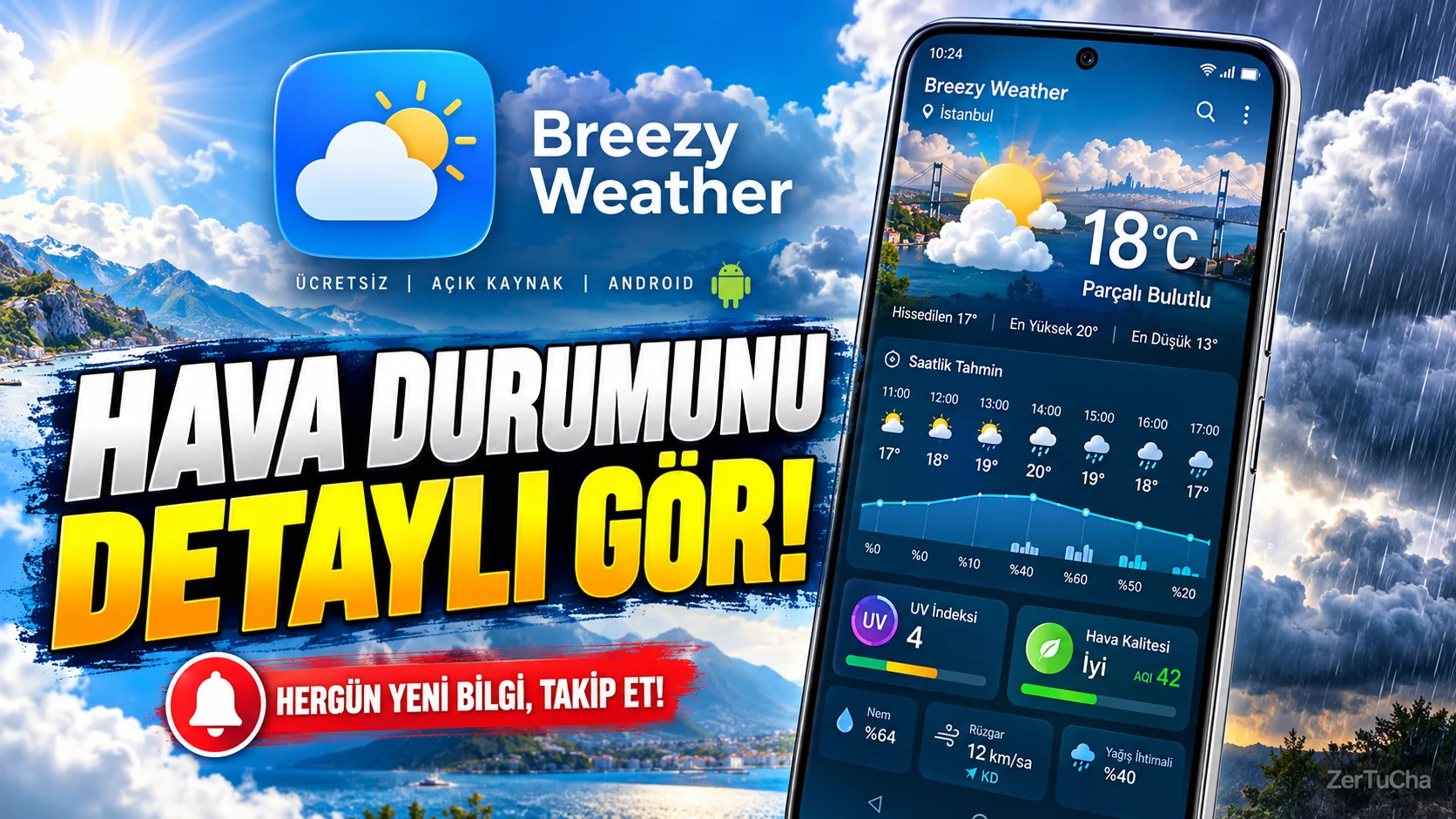
Application: Breezy Weather
- Breezy Weather official GitHub repository
- Breezy Weather official release records
- Breezy Weather — F-Droid page
- Breezy Weather privacy policy
Important: The developer states that it does not plan to publish the app on Google Play. Therefore, reliable distribution sources such as official GitHub versions or F-Droid should be used.
If your weather app is only showing you the temperature, you may be missing some of the information you actually need.
Today we will review an open source Android application called Breezy Weather. In addition to hourly and daily forecasts, this application can also display information such as precipitation probability, air quality, pollen and UV index, depending on the data source used.
For example, you can check the possibility of precipitation before going out in the morning, and check air quality and UV information on days when you will do sports outdoors. Thanks to the home screen widgets, you do not have to constantly open the application to see the forecasts.
And it's free and open source. But it has a disadvantage: It is not published on Google Play. For installation, you need to use F-Droid or the developer's official repository.
Also keep in mind that not every weather source works with the same accuracy or coverage. Some information may vary depending on the source you choose.
If you use Android and want to follow the weather in more detail, you can check out Breezy Weather.
WHAT DOES IT DO?
Breezy Weather provides the weather forecast simply by asking “What is it like today?” An application prepared for users who do not want to reduce the question to the question.
In addition to the temperature forecast, it can display information such as hourly and daily forecasts, probability of precipitation, air quality, pollen, UV index and some weather warnings.
For example:
- On your way to work in the morning, you can check the chance of precipitation during the day.
- If you are going to do sports outdoors, you can check the UV index and air quality.
- You can follow how the temperature will change throughout the day from hourly graphs.
- Thanks to the home screen widgets, you can check the weather forecast without constantly opening the application.
Feature availability may vary depending on the weather data source you select. GitHub
HIGHLIGHTS
Hourly and daily forecasts: The application can provide daily and hourly forecasts for up to 16 days on supported sources.
Rainfall information: There is a possibility of precipitation and some sources have short-term precipitation forecasts.
Air quality: You can review air quality information according to supported data sources.
Pollen and mold: Pollen and mold information can be provided in appropriate sources.
UV index: It can provide additional information about the effect of the sun on days when you will spend time outdoors.
Widgets: You can view weather information on your phone's home screen.
Multiple data sources: The project supports more than 50 weather sources. However, it is not guaranteed that every source will offer the same coverage in every country or feature. GitHub
WHY IS IT WORTH EXPLORING?
The most important difference of Breezy Weather is that it is open source and offers the user the opportunity to choose from different weather sources.
There are also customization options for the app's appearance, graphics and widgets.
This approach is especially meaningful for users who frequently check weather information, prefer open source software, and want to see detailed forecasts on their home screen.
However, after installing the application, it is important to choose the right data source. Just because a weather app looks good doesn't mean its forecast will be equally accurate everywhere.
ADVANTAGES AND DISADVANTAGES
Advantages
- Free and open source.
- Offers hourly and daily forecasts.
- Additional information such as air quality and UV may be available.
- There are widget and graphic options.
- The user can limit GPS access by manually selecting his/her location.
Disadvantages
- Only available on Android.
- Cannot install via Google Play.
- It is necessary to use F-Droid or the official project repository for installation.
- Features and prediction quality may vary depending on the selected source.
- Privacy policies of weather sources may differ from each other.
WHO IS IT SUITABLE FOR?
Suitable for:
- Those who check the weather frequently.
- Those who plan outdoor activities.
- Those who need additional information such as air quality or UV.
- Those who like to use widgets on their Android phones.
- Those who prefer free and open source applications.
Not so suitable:
- iPhone users.
- Those who want to install applications only from Google Play.
- Those who do not want to deal with source selection and settings.
- Those who expect all weather features to work equally in every location.
STARTER GUIDE
- Get and install F-Droid's official app.
- Search for Breezy Weather in F-Droid and install the appropriate version.
- You can manually select your location at first startup or choose to grant location permission.
- Select the weather source you want to use and review the scope of forecasts offered.
- Check sections such as hourly forecasts, chance of precipitation and air quality.
- Add a widget to the home screen if you want; so you can access the current forecasts faster.
Hint: If you don't want to grant location permission, try adding your city manually. This way you can reduce the app's need for GPS access.
PRIVACY AND RELIABILITY
According to Breezy Weather's official privacy statement, the app does not collect personal data. However, if you choose to use your current location, this information can be shared with the sources you choose to provide weather data.
Also application:
- Can be used by selecting a city without location access.
- Notes that it does not include automatic tracking codes or automatic crash reporting systems.
- Uses third-party weather and location services for some functionality.
Therefore, it is necessary to distinguish between the application's own privacy approach and the data policies of the weather provider you use. GitHub
Trusted installation recommendation: Downloading the app from unknown APK sites. Use F-Droid or the official GitHub release page; If possible, also check the version and signature information.



Henüz yorum yapılmamış. İlk yorumu siz yapın!
Bir Yorum Bırakın